Online Billing and Credit Card Processing
BlueCamroo Helps Keep Your Cash Flow Flowing!
Meet the Newest Member of Your Accounting Department
BlueCamroo allows you to easily generate invoices and bill your clients, create invoice reminder schedules to ensure you get paid, and provide your customers with their very own portal to view and pay invoices online.
Invoices that have not been sent and invoices that have not been paid are a constant problem for many businesses. With so much work going on elsewhere, businesses often forget about getting their bills paid until it becomes something very noticeable.
Creating Invoices in BlueCamroo is a Breeze!
Using BlueCamroo, you can send invoices based on total project costs, percentage amounts according to project stages or even by specific dates. Easily customize the look of the invoices your customers will see.
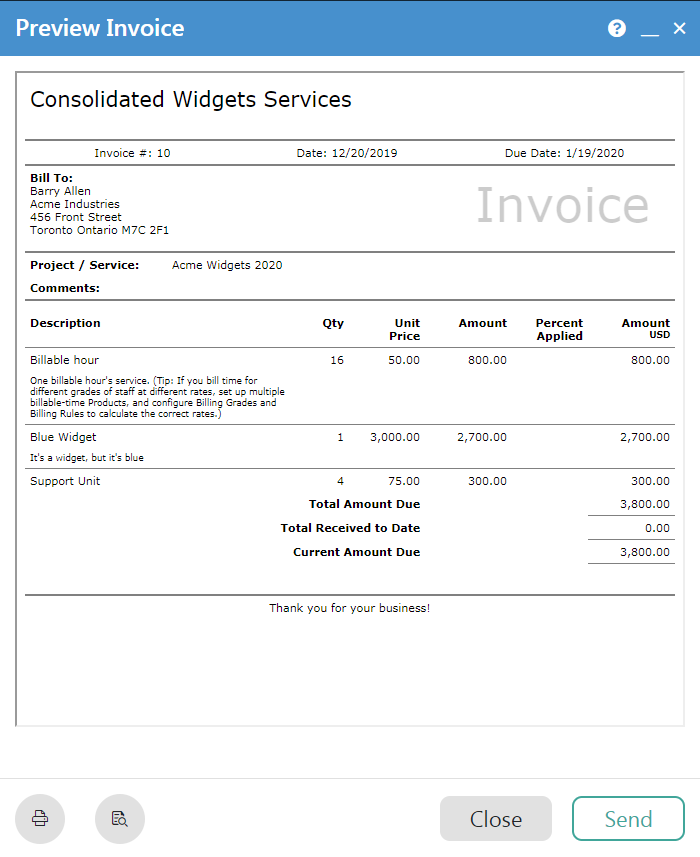
Need to split payments or bill a client monthly? No problem. BlueCamroo lets you set up products with customizable recurring payment periods or allow a customer to pay for a product by making monthly payments.
Set Up Automated Invoice Reminders
Why try to keep track of every bill that is to be paid on your Calendar or in a Spreadsheet when you can have BlueCamroo sending out Invoice Reminders around the clock and take appropriate actions, all done automatically.

All you need to do is set the initial schedule and BlueCamroo will take care of the rest.
Allow Your Customers to Pay Bills Online
BlueCamroo can even be configured to accept payments for invoices online. Using a credit card processor of your choice (Moneris, Chase, First Data, Authorize.Net, Paypal, PayPal Lite), your customers will be able to view and pay their invoices right online.
Simplify Your Business
With BlueCamroo’s strong invoicing functionality and ability to post all invoice transactions into QuickBooks, your business is sure to save a lot of time.
