Adopt BlueCamroo gradually as the needs of your company grow
BlueCamroo is a fully integrated business solution with all of its distinct features included in each individual system extension (CRM, Sales, Projects and Support) working in unison as ONE.
Yet BlueCamroo’s subscription model allows each user to gain access to a single or multiple system extensions with unique features that are deemed essential to fulfil their job requirements. The feature set of any extension is all-inclusive, meaning there is no tier-based limits set on them, and all extensions are associated with their corresponding subscription plans.
|
Billed monthly
Billed annually
|
Best Value | ||||
|---|---|---|---|---|---|
| PLANS |
Free CRM
Base Foundation for entire platform. Foundation
|
Sales
Most Popular! Extension
(Includes CRM)
|
Projects
Extension
(Includes CRM)
|
Support
Extension
(Includes CRM)
|
Complete
Everything
(Includes CRM)
|
| Manage leads, customers, contacts, suppliers & tasks | Energize your business with advanced CRM | Manage projects from start-to-finish | Efficiently and effectively support customers | Oversee and run the entire business from one place | |
|
|
|
|
|
|
|
| PRICING |
Free
Forever for up to 2 Users
Additional Users $5 $6
USD / month / user paid annually month-to-month |
$ 21
USD / month / user
paid annually month-to-month |
$ 21
USD / month / user
paid annually month-to-month |
$ 8
USD / month / user
paid annually month-to-month |
$ 41
USD / month / user
paid annually month-to-month |
| Get Started Today | Start Free Trial | Start Free Trial | Start Free Trial | Start Free Trial | |
| FREE TRIAL | 14 Days | 14 Days | 14 Days | 14 Days | |
| IDEAL FOR | Any business with customers | Sales and Marketing Teams | Project Teams | Customer Support Teams | Senior Management, or Users With Multiple Roles |
|
|
|
|
|
|
|
| TOP FEATURES | Offers essential CRM features, such as:
Leads and Lead Nurturing, Full Contact History, Task Management, Interaction Tracking, Collaboration, Workflow Automation, and more... |
Includes everything in CRM, plus:
Opportunities, Estimates, Sales Quotes, Social CRM, Sales Pipelines, Sales Forecasting, Revenue Analysis, Sales Dashboard, Invoicing & Billing, Time Tracking, Expenses, Email Campaigns, Adv Workflow Automation, Website & Landing Page Builder, and more... |
Includes everything in CRM, plus:
Project & Stage Templates, Time / Budget / Resource Management, Billing, Adv Workflow Automation, Visual Workbench for Projects, Workspace Collaboration Bridge, and more... |
Includes everything in CRM, plus:
Email Ticketing System, Client Portal, Adv Workflow Automation, Knowledge Database, and more... |
Combines all into one seamless solution.
CRM, Sales, Projects, and Support |
| See More Details See Less Details | |||||
| Users | Unlimited | Unlimited | Unlimited | Unlimited | Unlimited |
| Storage |
2 GB per User |
5 GB per User |
5 GB per User |
5 GB per User |
5 GB per User |
| Support |
Included |
Included | Included | Included | Included |
| Bespoke Development | Available | Available | Available | Available | Available |
| Training & Onboarding Services | Available | Available | Available | Available | Available |
|
Core Features
|
|
|
|
|
|
| Personal To-Do List |
|
|
|
|
|
| Tasks and Task Management |
|
|
|
|
|
| Task and Accountability Management |
|
|
|
|
|
| Multiple Task "Stopwatch" Timers |
|
|
|
|
|
| Time Tracking with Approval Management |
|
|
|
|
|
| Tracking and Reporting Billable /
Non-Billable Time |
|
|
|
|
|
| Automated Timesheet Posting to Invoice |
|
|
|
|
|
| Configurable Workflow Rules |
|
|
|
|
|
| Update Streams |
|
|
|
|
|
|
|
|
|
|
|
|
|
|
|
|
|
|
|
|
|
|
|
|
|
|
|
|
|
| Calendars |
|
|
|
|
|
| Appointment Scheduling |
|
|
|
|
|
| Alerts and Reminders |
|
|
|
|
|
| Notifications |
|
|
|
|
|
| Drop-box for Email, Tasks, and To-Dos |
|
|
|
|
|
| Email Integration |
|
|
|
|
|
| What's New List |
|
|
|
|
|
| Event Resources Management |
|
|
|
|
|
| Work in English, French, or Spanish |
|
|
|
|
|
| Mobile App |
|
|
|
|
|
| External User Portal |
|
|
|
|
|
| System Support, Help and Documentation |
|
|
|
|
|
|
CRM Features
|
|
|
|
|
|
| Contacts |
|
|
|
|
|
| Customers |
|
|
|
|
|
| Leads |
|
|
|
|
|
| Suppliers |
|
|
|
|
|
| Lead Capturing |
|
|
|
|
|
| Leads Import |
|
|
|
|
|
| Lead Qualification |
|
|
|
|
|
| Lead Nurturing |
|
|
|
|
|
| Lead Profiling |
|
|
|
|
|
| One Click Lead to Customer Conversion |
|
|
|
|
|
| Contact Recording & Planned Follow-up |
|
|
|
|
|
| Customer Profiling |
|
|
|
|
|
| Pipeline Management |
|
|
|
|
|
| Contact Roles Identification |
|
|
|
|
|
|
|
|
|
||
|
|
|
|
||
|
|
|
|||
|
|
|
|
||
|
|
|
|
||
|
Advanced Sales Tools
|
|
Limited | Limited |
|
|
| Web-to-Lead Forms |
|
|
|||
| Web-to-Opportunity Forms |
|
|
|||
| Lead Capture from Email |
|
|
|||
| Opportunity Tracking |
|
|
|||
| Opportunity Nurturing |
|
|
|||
| Sales Pipelines |
|
|
|||
| Sales Forecasting |
|
|
|||
| Revenue Analysis |
|
|
|||
| One Click Opportunity to Project Conversion |
|
|
|||
| Email Sequences |
|
|
|||
| Multiple Estimate Management |
|
|
|||
| Sales Quotes |
|
|
|||
| Sales Orders |
|
|
|||
| Invoicing |
|
|
|
||
| Pricebooks |
|
|
|
||
| Products & Services Catalog |
|
|
|
||
| Customer Pricing |
|
|
|
||
| Social Scout |
|
|
|
||
| Work With Multiple Currencies |
|
|
|
|
|
| Flexible Taxation Setup | Unlimited | Unlimited | Unlimited | Unlimited | |
| Define Allowable Countries |
|
|
|
|
|
|
Project Management
|
|
|
|||
| Projects |
|
|
|||
| Project Templates |
|
|
|||
| Stage Templates |
|
|
|||
| Auto Scheduling |
|
|
|||
| Invoicing Management |
|
|
|
||
| Stages and Tasks Dependencies |
|
|
|||
| Recurring Tasks and Stages |
|
|
|||
| Visual Time Line |
|
|
|||
| Visual WorkBench for Projects |
|
|
|||
| Resource Management |
|
|
|||
| Project Amendments Management |
|
|
|||
| Internal and External Project Roles |
|
|
|||
| Online Client Sign-off |
|
|
|||
| Budgets |
|
|
|||
| Budget vs. Actuals Tracking |
|
|
|||
|
Email Campaigns
|
|
|
|||
| Bring your own SMTP |
|
|
|||
| Email Credit (One time) | 100 | 100 | |||
| Additional Email Credits | Available | Available | |||
| Static and Dynamic Email Lists |
|
|
|||
| Opt Out Tracking |
|
|
|||
| Configurable Email Templates |
|
|
|||
|
|
|
|||
|
|
|
|||
|
|
|
|||
| Email Click-through and Tracking Analytics |
|
|
|||
| Automatic CSS Inlining |
|
|
|||
| Rich Content / Text Only Email Versions |
|
|
|||
| Campaign Analytic Reports |
|
|
|||
|
Customer Support Management
|
|
|
|||
| Customer Cases / Issues |
|
|
|||
| Support Knowledge Base |
|
|
|||
| SLA Management |
|
|
|||
| Email-based Support Tickets Automation |
|
|
|||
| Cases / Tickets Dashboard |
|
|
|||
| Social Scout |
|
|
|
||
| External User Portal |
|
|
|||
|
Reports & Dashboards
|
Limited |
|
|
|
|
| Top-down Snapshot Views |
|
|
|
|
|
| Leads Dashboards |
|
|
|
|
|
| Sales Dashboards |
|
|
|||
| Projects Dashboards |
|
|
|||
| Support Dashboards |
|
|
|||
| Standard Reports |
|
|
|
|
|
| Custom Report Builder |
|
|
|
|
|
| Export Reports to Excel / CSV |
|
|
|
|
|
| Export Reports to Presentation-Ready PDF |
|
|
|
|
|
|
Customization
|
Limited |
|
|
|
|
| Extra Fields throughout all Details Pages |
|
|
|
|
|
| Custom Forms |
|
|
|
|
|
| Personal Email Templates |
|
|
|
|
|
|
|
|
|||
|
|
|
|||
|
|
|
|
|
|
|
|
|
|
|||
| Use Own SMTP Server for System Emails |
|
|
|
|
|
|
Integrations
|
|
|
|
|
|
|
|
|
|
|
|
|
|
|
|
|
|
|
|
|
|
|
|
| Accounting |
|
|
|
||
|
|
|
|
|
|
|
|
|
|
|
|
|
|
|
|
|
|
|
|
|
|
|
|
|
|
|
|
|
|
|
|
|
|
|
|
|
|
|
|
|
|
|
|
|
|
|
|
|
|
|
|
|
|
|
|
|
|
|
|
|
|
|
|
|
|
|
|
|
|
|
|
|
|
|
|
|
|
|
|
|
|
|
|
|
|
|
|
|
|
|
|
|
|
|
|
|
|
|
|
|
|
| API |
|
|
|
|
|
|
Website Development Platform
|
|
|
|
||
| Dashboard |
|
|
|
||
| eCommerce Module |
|
|
|
||
| Connect to Your Merchant Service |
|
|
|
||
| Connect to Your Shipping Service |
|
|
|
||
| Setup Discounts for Individuals and Wholesalers |
|
|
|
||
| Shoppers Database |
|
|
|
||
| Use as Ecommerce or Product Catalog |
|
|
|
||
| Connect Your Websites to HubSpot |
|
|
|
||
| Build Unlimited Websites/Landing Pages/Microsites |
|
|
|
||
|
|
|
|
||
|
|
|
|
||
|
|
|
|
||
|
|
|
|
||
|
|
|
|
||
|
|
|
|
||
| Reliable and Secure Web Hosting | Available | Available | Available | ||
| Connect websites to Projects in BlueCamroo |
|
|
|||
| Build a Customer Database |
|
|
|
||
| Connect Web-to-Lead Forms to BlueCamroo |
|
|
|||
| Connect Web-To-Opportunity Forms to BlueCamroo |
|
|
|||
| Google Analytics |
|
|
|
||
| Setup Multiple Languages |
|
|
|
||
| Help Documentation |
|
|
|
||
| Workflow Guides |
|
|
|
||
| Basic Support |
Free for 14 Days Additional Support
|
|
|
|
|
| Context Sensitive Help |
|
|
|
|
|
| Help Videos |
|
|
|
|
|
| User Guide |
|
|
|
|
|
| Included with any extension | |||||
| PLANS | CRM | Sales | Projects | Support | Complete |
|
Foundation
|
Extension
(Includes CRM)
|
Extension
(Includes CRM)
|
Extension
(Includes CRM)
|
Everything
(Includes CRM)
|
|
| Effectively manage your contacts, leads, and customers. | Boost your teams with advanced sales & marketing tools. | Manage your projects from start-to-finish. | Effectively and efficiently support your customer. | Oversee and run your entire business from one place. | |
| PRICING |
Free
Forever for up to 2 Users
Additional Users $5 $6
USD / month / user paid annually month-to-month |
$ 21
USD / month / user
paid annually month-to-month |
$ 21
USD / month / user
paid annually month-to-month |
$ 8
USD / month / user
paid annually month-to-month |
$ 41
USD / month / user
paid annually month-to-month |
*All prices are in US Dollars and are subject to GST/HST for subscribers in Canada.
What Did They Say?!

-
We love BlueCamroo, it runs our business! It is the most integral tool our team uses to run an efficient, profitable business that delivers excellent client results!
CEO & Owner WEB Lead Generator — Toronto, Ontario
-
As a digital agency 100% involved in the success of our customers, we need to keep our business under control : continuously feed our funnel, convert new customers, upsell existing customers, manage projects, track time, support customers…
BlueCamroo is covering all our needs and is now our unique collaborative solution.
CEO & Owner FGP Solutions — Strasbourg, France
-
BlueCamroo has been a great Partner. When we first started working with them we were charting new waters in our industry. They provided great guidance on how to exceed our customer's expectations as well as include functionality and interface what would scale.
President Dual Green Consulting — Austin, Texas
-
Over the past seven years, BlueCamroo has been a critical partner to our success. From managing our unique customer requirements to building additional software tools that integrate with BlueCamroo. If you need a CRM that has great flexibility, scalability and a team with a can-do attitude, BlueCamroo is your go to CRM.
Director of Enrollment Services Beneport — Clearwater, Florida

Frequently Asked Questions
How does the subscription plan work? |
|
With BlueCamroo you only pay for the modules each user needs. You can mix and match your user types and each will only pay for their modules. For example You can have 2 users that have access to everything, 4 people that only need access to sales, 3 that only need access to projects and 1 that only needs customer support. You would pay 2 Users at $49/m, 4 users at $17/m, 3 users at $21/m, and 1 user at $8/m. That way your bill doesn’t become bloated with features that your users never use, while your workspace still retains the benefits of an all-in-one. |
What languages is BlueCamroo available in? |
|
Currently BlueCamroo is currently available in English, French and Spanish. |
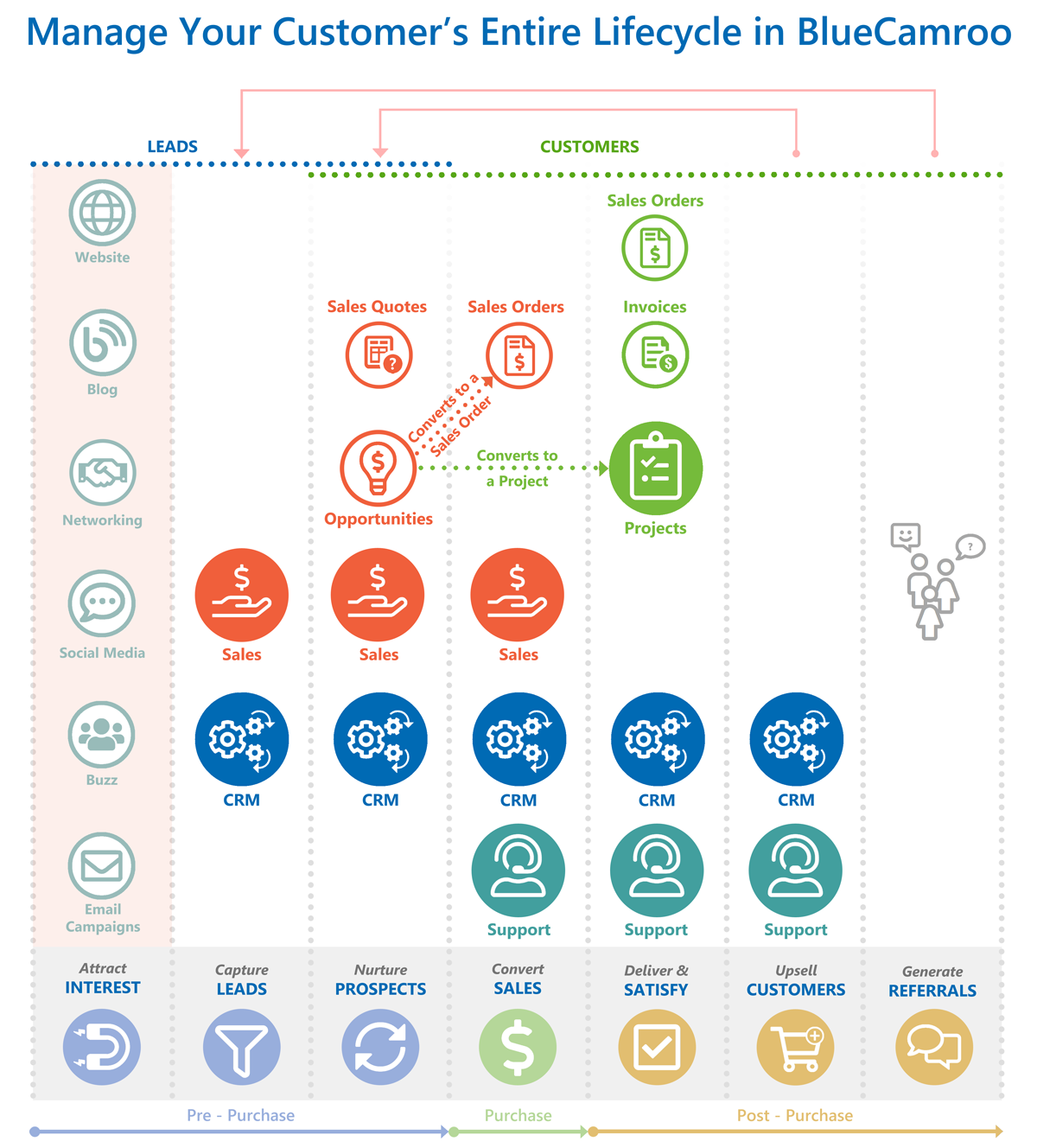
How do I manage my client's entire lifecycle in BlueCamroo? |
|
Please refer to this diagram
|
How do the 14-day free trials work? |
|
You can select to do separate 14-day trials for each of our advanced modules: CRM, Sales, Project Management, Support & Ticketing, and Complete. The administrator simply goes into the Setup section and changes the User Type of the users they want to trial to the module they want to try and that will start the 14-day Free trial. You will get one trial per extension per entire workspace. |
Do I need to see a demo first before the free trial? |
|
No. However we strongly recommend it as we think it's important for you to understand the system and where it fits into your business, so that you can determine the best place to start to get the most out of the wide range of services offered through BlueCamroo. We’ll show you how to quickly get started for maximum impact and value. |
Do I have to provide a credit card during the trial? |
|
No, your 14-day trial period is free and completely free of commitment. We do not ask for a credit card until you are ready to sign up for the service. Then just add your employees to the BlueCamroo system as needed to start running your business more efficiently and profitably. |
Do I have to sign a long-term contract? |
|
Nope. Never. There is absolutely no contract to sign! You are welcome to use the service on a month-to-month basis or you can pay for a year in advance to receive a discount on each user. |
What if I need help during my trial? |
|
You will have access to our support team during your trial period and beyond. Also, we offer onboarding services to make sure your entire team is properly trained to use BlueCamroo efficiently. This helps to ensure you are getting the most out of the system for your business. |
Can I build and manage websites or landing pages in BlueCamroo? |
|
With BlueCamroo's modern Web Development Platform (WDP) you can create fully responsive Standard Websites, Landing Pages, or powerful eCommerce websites. The WDP is included in your subscription so you can create as many websites or landing pages as you want. You can build for yourself or for your clients as long as you host with BlueCamroo (Standard hosting fees apply). |
When doing nothing can cost you your business, subscribing to change is a surprisingly good value. Opt for change!
Start by trialing BlueCamroo CRM for Free
