Track Billable and Non-Billable Time Spent on Projects, Tasks, and Client Service
BlueCamroo makes tracking time a snap, by baking a time tracking system right into our task management process. Whenever you update or close a task, you can note the time spent on it and whether it’s billable. Run searches and reports to find out how you can better allocate your resources, or implement chargeable services.
Time Tracking for Project Management, Customer Service and more...
If you need to see where you or your team is spending the most time, you can easily see where time is being spent in the time sheets. By viewing a time sheet, you not only get to see a breakdown of the week and where time has gone, but also if it’s been spent on Leads, Accounts, Projects, Cases or other areas.
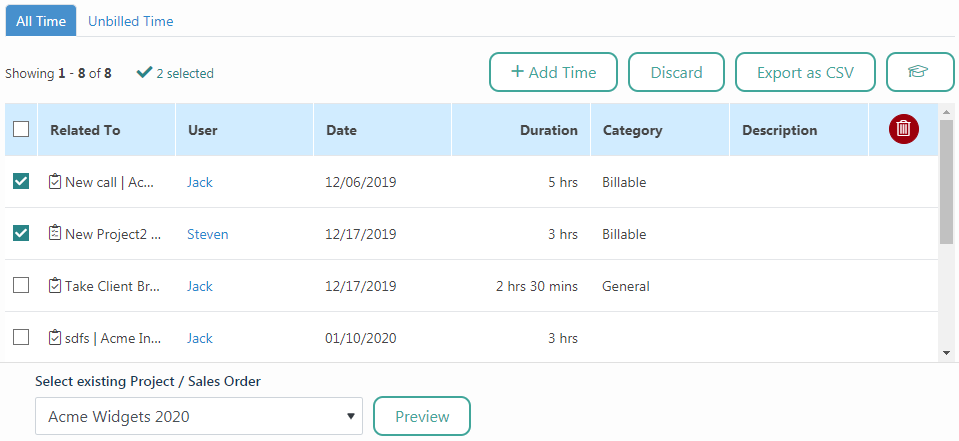
Maximize Revenue By Capturing Your Time
Maximize revenue by capturing employee timesheet tasks as billable time. Don't let hours logged by employees go un-billed. BlueCamroo lets you get completed tasks onto invoices in a clear and concise manner.
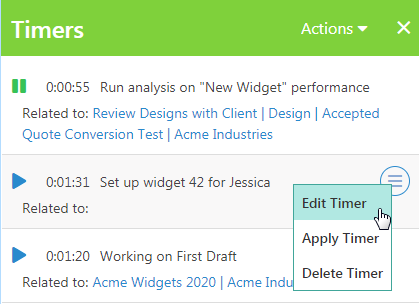
Stay Accurate with Timers
BlueCamroo includes Timers that run right in your workspace to help ensure you capture every piece of time accurately both for billing and tracking purposes. Timers can be used to keep track of any activity and associate the time with any kind of record (customer, project, opportunity, etc.).
Analyze Time Tracked for Projects
Often times you’ll want to see the total amount of time that has been tracked on some of your projects. By visiting each project’s time section, you can quickly see what has happened, how much time has been tracked, and how much of that time you can bill for.
The time section doesn’t just apply to projects either, if you’re in leads, contacts, accounts, opportunities or cases, time details are always available.
Time logged to Projects will show up as costs for the Project's Budget. You may not necessarily bill for that time entry, but it is still an internal cost that you incur. Your Projects Budget is automatically updated with every Time entry to the Project itself, not just Time logged to its Tasks.
Export Your Time Sheets or Run Reports
BlueCamroo gives you every option when it comes to running any sort of analysis on tracked time within your company.
Export time search results to a spreadsheet for complex analytics or even use BlueCamroo reports to quickly run an analysis and chart the results. When it comes to finding out more, we make it easy.
Register and Start Working Today!
- Solution
- Pricing
- How Your Business Runs
- Developers
- API Documentation

©2026 BlueCamroo Inc. All righs reserved